Table of Contents
ToggleCorrection Areas Upper Jaw (TiF®)
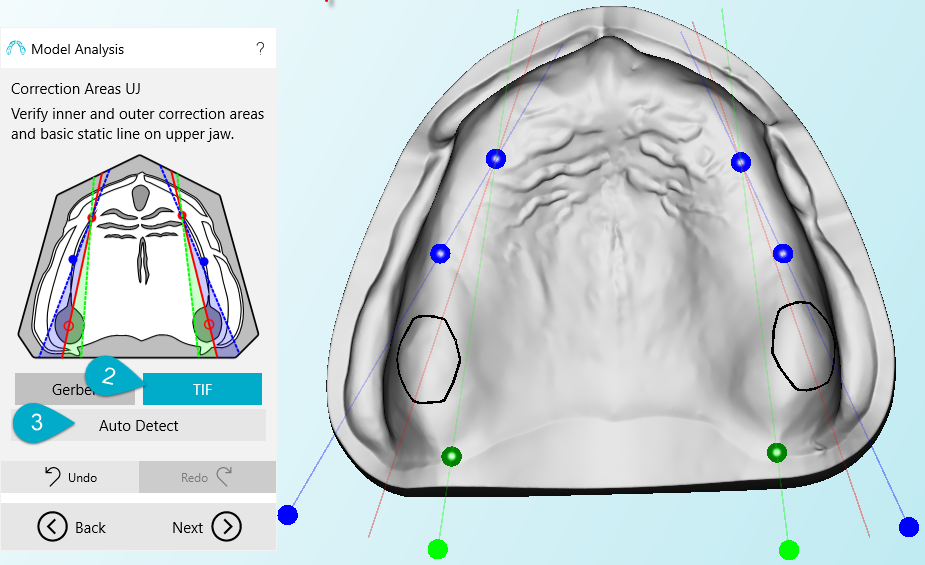
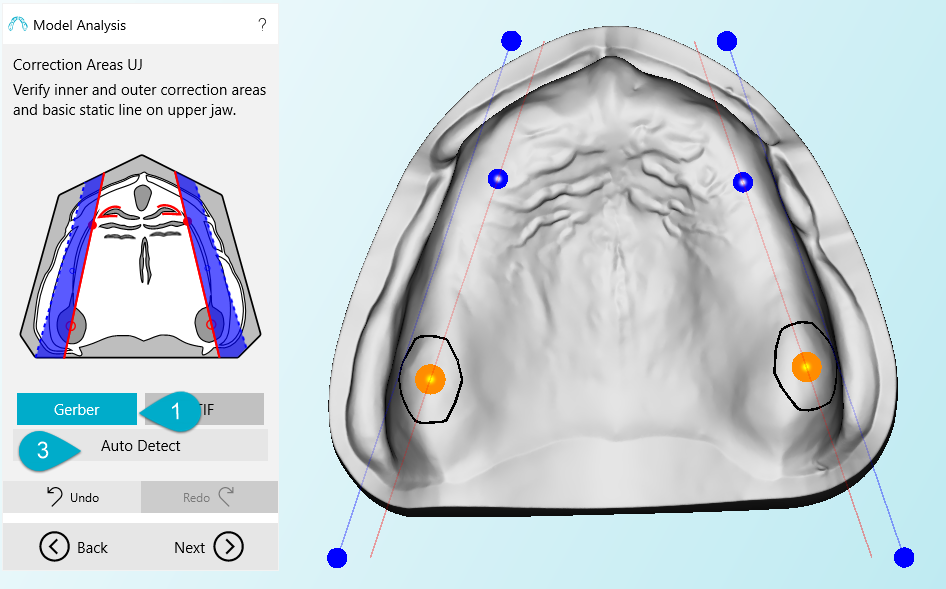
Resulting from the specified points the correction areas are displayed for the upper and the lower jaw. A working prosthesis must be located between the blue and the green plane respectively.
If the lines are too small to enable a valid result, the planes may be moved here. The red line is a static one and may not be changed. This line shows the canine lines that result from the definition of the alveolar ridge.
You may move a plane by using the slider or moving the points shown on the planes. To reset the planes to its origin you click “Auto Detect” (3).
TIF
Gerber
Navigation
- BD Creator Plus
- BD Creator Plus installation instructions
- How to Use
- Settings
- Help & Support
- Creating a prosthesis
- Full Prothesis Workflow
- New Project
- Occlusal Plane
- Model Analysis
- Basic model analysis
- Extended Model Analysis
- Marking the anatomical landmarks in the upper jaw
- Marking the anatomical landmarks in the lower jaw
- Raphe Median Planes
- Labial surface limit
- Basic statics and external correction with lingualized occlusion (according to Prof. Dr. Gerber)
- Correction Areas Upper Jaw (TiF®)
- Correction Areas Lower Jaw
- Final Setup Lines
- Undercuts
- Denture Border
- TeethMaster
- Free Forming
- Export
- Gnathofinder
- Custom Tray
- Full Prothesis Workflow
- Tools